Enable a GCP project
This is the first step to running pipelines in a Google Cloud project. It creates a Deployment in the Infrastructure Manager service — every resource GENI Workflows provisions in GCP is created through Terraform templates managed by Infra Manager.
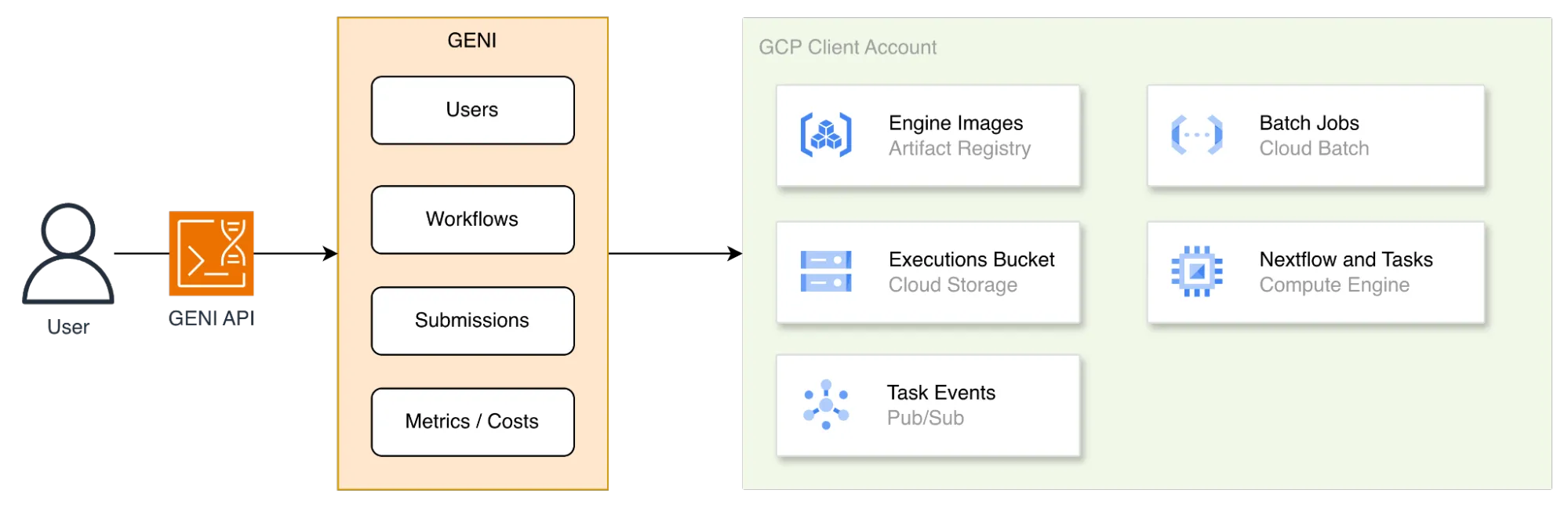
What GENI uses inside a GCP project: Artifact Registry for engine images, Cloud Batch for jobs, Cloud Storage for the executions bucket, Compute Engine for Nextflow and its tasks, and Pub/Sub for task events.
Prerequisites
Section titled “Prerequisites”- The
gcloudcommand installed. - A GCP user with administrative permissions on the project.
Run the setup
Section titled “Run the setup”gcloud auth logingcloud auth application-default login
geni setup enable-gcp \ --project-id <project-id> \ --region <region> \ --credentials-output gcp-wif.json| Argument | Meaning |
|---|---|
<project-id> |
The project’s unique identifier, for example useful-loop-496215-i8 |
<region> |
The region to use, for example us-central1 |
gcp-wif.json |
Output file holding the generated credentials |
The command provisions a deployment named geni-setup, containing IAM resources, and writes
a JSON credentials file.
Set up the FOCUS dataset so cost data is available, then create the environment.